
Healing follow-up
Healing Follow-up
Poruke klijentkinji posle tretmana - uputstvo za negu, provere tokom zarastanja i javljanje posle godinu dana. Automatski preko WhatsApp-a ili ručno.
Messages to the client after a treatment - aftercare instructions, check-ins while it heals, and a note after one year. Automatically over WhatsApp, or manually.
Ažurirano za verziju 1.7.0 - oktobar 2026
Updated for version 1.7.0 - October 2026
Šta je healing follow-up Pro
Healing follow-up je niz poruka koje klijentkinja dobija posle tretmana, po unapred određenom rasporedu. Ti ga pokrećeš jednim dodirom, a aplikacija pamti kad je koja poruka na redu.
- Nega posle tretmana - odmah, čim pokreneš
- Check-in dan 3 - kako zarasta
- Check-in dan 7
- Kontrola posle 4 nedelje - podsetnik na kontrolu i korekciju
- Godinu dana od tretmana - vreme je za osvežavanje
Koje poruke idu zavisi od tipa tretmana:
- Prvi tretman - svih pet
- Korekcija - nega posle tretmana, dan 3 i dan 7
- Osvežavanje - nega posle tretmana, dan 3, dan 7 i godinu dana
Postoje dva režima. U automatskom poruke šalje PMUdesk preko WhatsApp broja tvog salona. U ručnom aplikacija priprema tekst i podseća te, a poruku šalješ ti. Režim se bira sam, prema tome da li je WhatsApp povezan.
Healing follow-up je deo Pro plana, u oba režima. Na besplatnom planu red „Healing follow-up" u detaljima tretmana nosi oznaku Pro i vodi na ponudu.
Pokretanje
Sekvenca se ne pokreće sama kad sačuvaš tretman - pokrećeš je ti, kad je tretman zaista urađen.
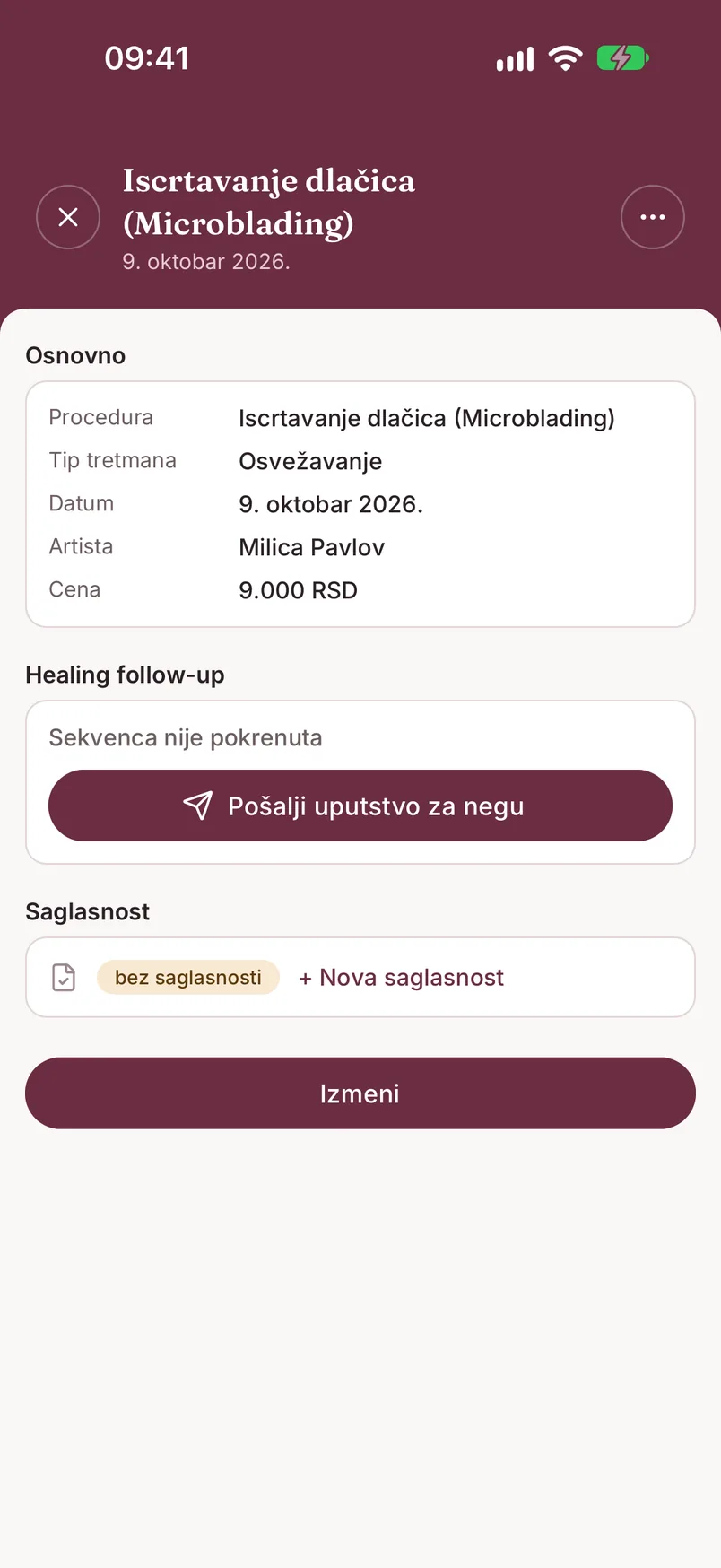
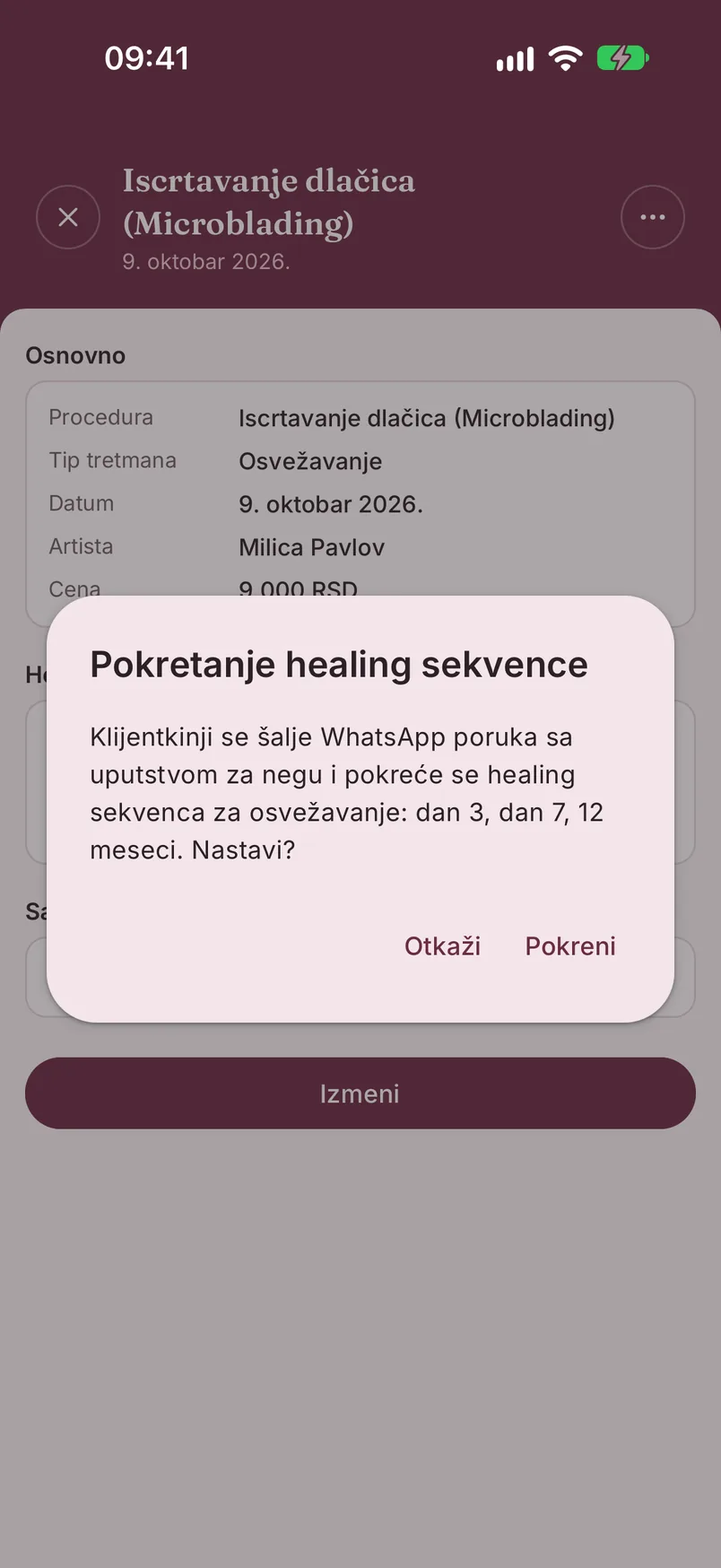
Otvori detalje tretmana. U delu „Healing follow-up" piše „Sekvenca nije pokrenuta"; dodirni „Pošalji uputstvo za negu". Prozor „Pokretanje healing sekvence" navodi koje poruke slede za taj tip tretmana - potvrdi sa „Pokreni".
Posle toga isti red pokazuje dokle se stiglo (npr. „1/5 poslato"), a dodir na njega otvara ekran sekvence sa svim koracima i datumima.
Dobro je znati:
- sekvenca se pokreće jednom po tretmanu
- za tretman stariji od 7 dana dugmeta nema - piše „Istorijski tretman - healing poruke nisu dostupne"
- klijentkinja mora da ima broj telefona na kartonu i da nije isključena iz poruka
- ako ukloniš tretman, preostale zakazane poruke se zaustavljaju
Automatski režim
Kad je WhatsApp broj salona povezan sa PMUdesk-om, poruke idu same - sa tvog broja, pa klijentkinja vidi tebe, ne nepoznat broj. Kako se broj povezuje: Povezivanje WhatsApp broja.
- Prva poruka (nega posle tretmana) ide odmah po pokretanju. Ostale stižu po rasporedu, ali ne noću - poruka koja bi pala između 21h i 9h čeka jutro
- Status svakog koraka vidiš na ekranu sekvence: „Zakazano", „Poslato", „Isporučeno", „Pročitano"
- Odgovori klijentkinje stižu i u WhatsApp Business aplikaciju na tvom telefonu i u PMUdesk - na kartonu, u delu „Komunikacija". Odgovaraš iz svoje WhatsApp aplikacije, a prepiska se u PMUdesk-u prikazuje sama
- Fotografija zarastanja koju klijentkinja pošalje dobija dugme „Sačuvaj u karton" - slika se čuva uz tretman, u grupi „zarastanje"
- Ekran „Danas" pokazuje karticu „Healing: N klijentkinja čeka odgovor". Dodir otvara listu „Čekaju odgovor"; kad odgovoriš, poruku označiš kao „Rešeno"
Ako se ispostavi da klijentkinja nema WhatsApp na tom broju, korak dobija oznaku „Nema WhatsApp", a baner nudi „Nastavi ručno" - ostatak sekvence tada ide u ručnom režimu.
Ručni režim
Sekvenca ide ručno kad WhatsApp salona nije povezan, ili kad poruke ne stižu na broj te klijentkinje. Raspored je isti - razlika je samo u tome ko šalje.
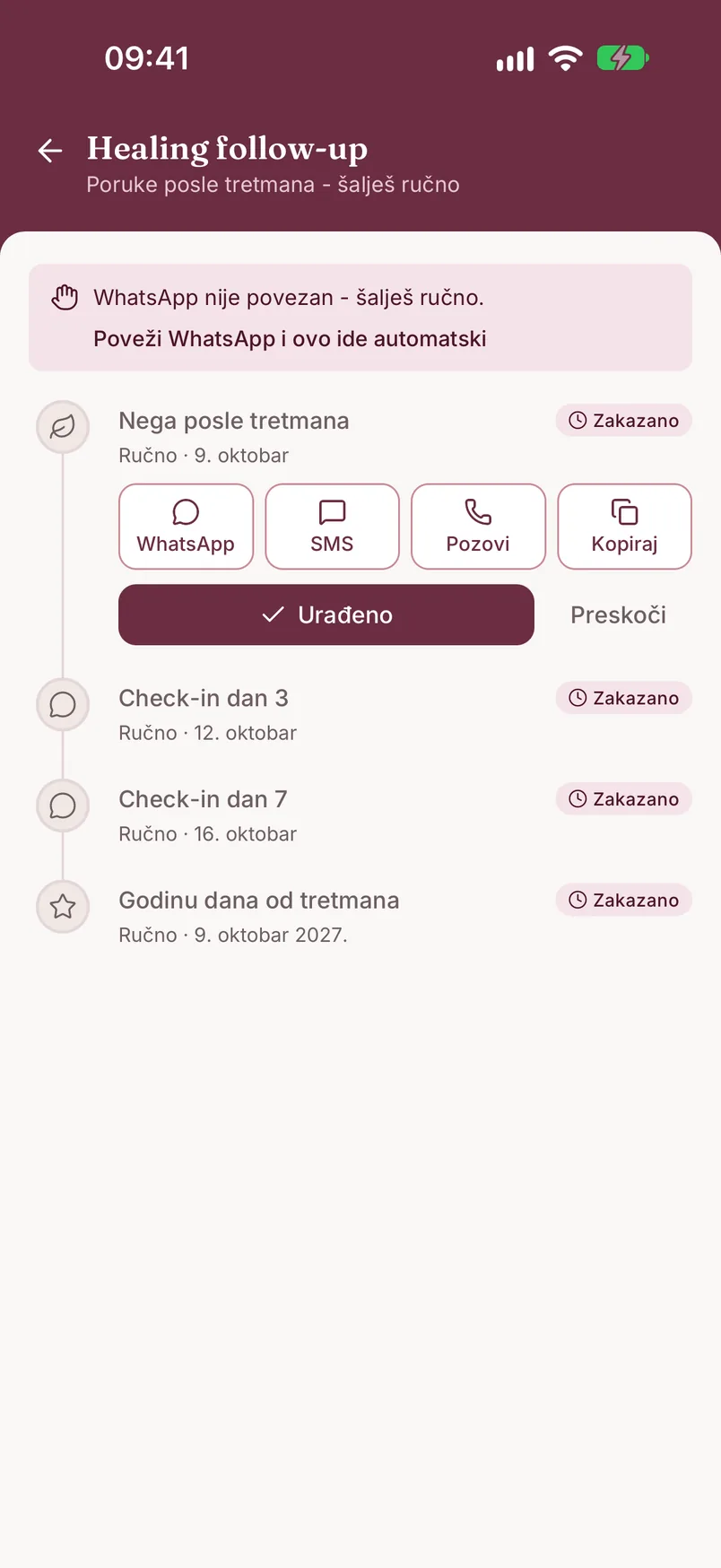
Na vrhu ekrana sekvence stoji baner sa razlogom, npr. „WhatsApp nije povezan - šalješ ručno.", uz prečicu „Poveži WhatsApp i ovo ide automatski". Uz svaki korak piše „Ručno" i datum kad je na redu.
Korak koji je na redu ima dugmad:
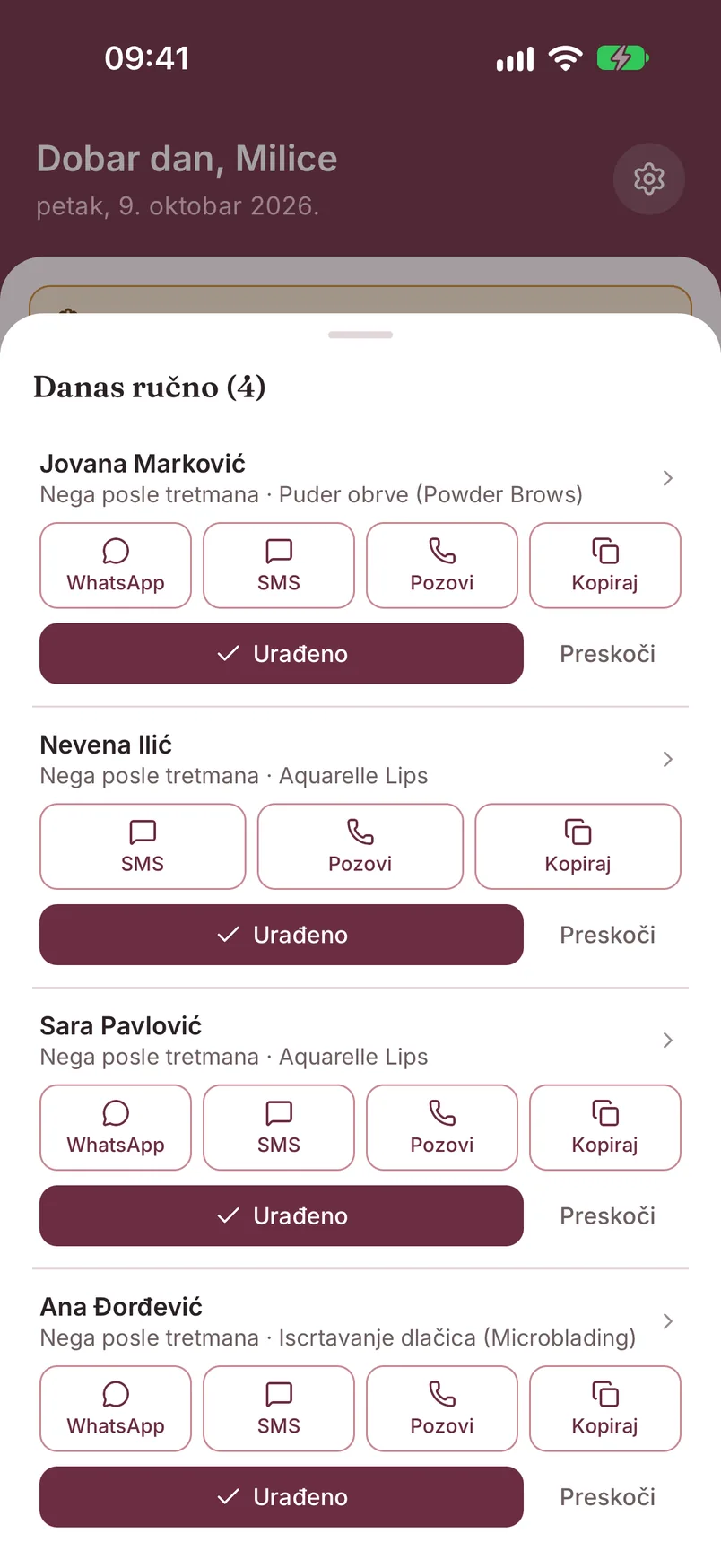
- „WhatsApp" - otvara WhatsApp sa klijentkinjom i pripremljenim tekstom poruke
- „SMS" - isto, kao SMS
- „Pozovi" - ako ti je lakše da pozoveš
- „Kopiraj" - kopira tekst, pa ga nalepiš gde hoćeš (Viber, Instagram...)
- „Urađeno" - označi kad pošalješ; korak dobija oznaku „Urađeno"
- „Preskoči" - ako ovu poruku ne želiš da šalješ
Prvi korak (nega posle tretmana) je na redu odmah po pokretanju. Korak koji ne označiš u roku od dva dana ističe sam, da ti lista ne bi ostala zatrpana.
Šta je danas na redu
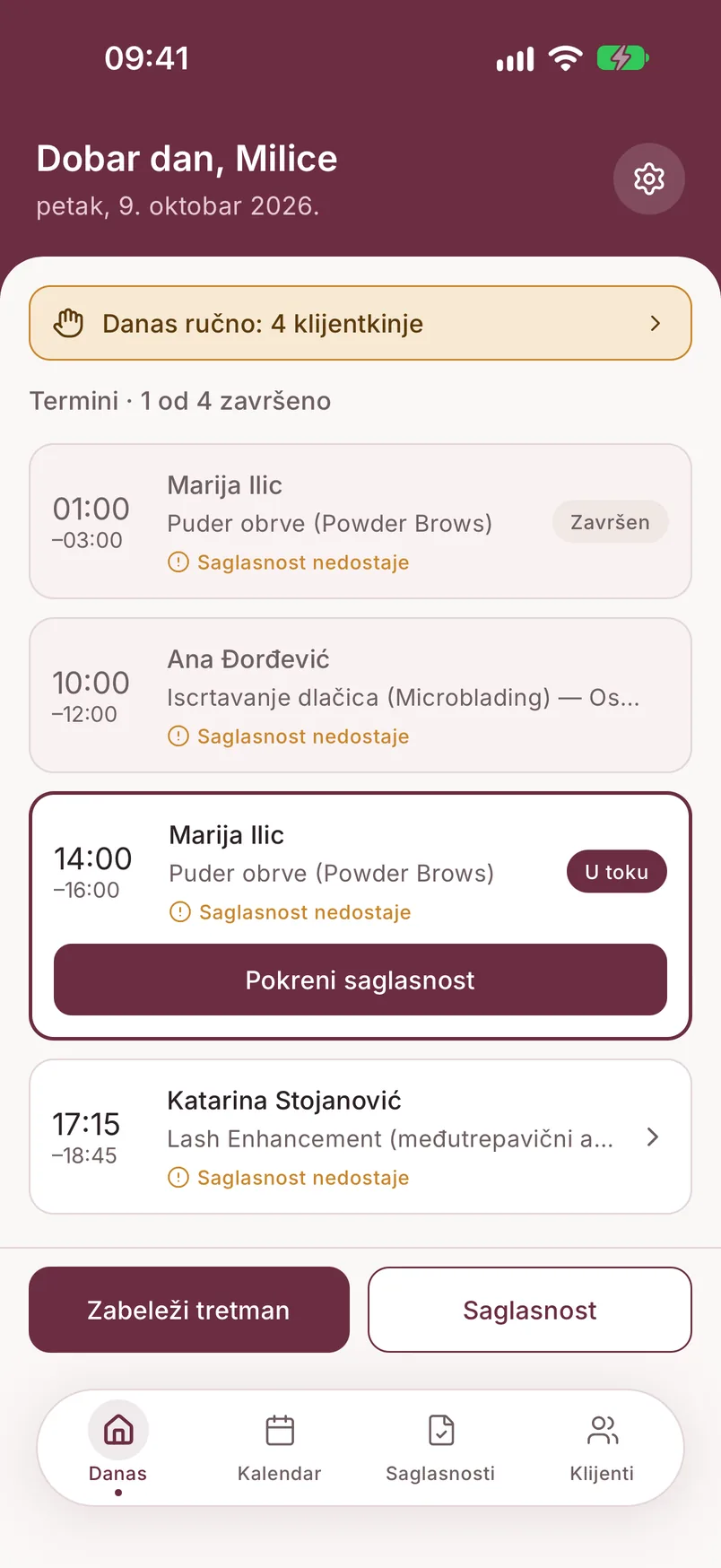
Ne moraš da pamtiš rasporede. Ujutru, posle 9h, stiže obaveštenje „Danas ručno" sa imenima klijentkinja kojima danas treba da se javiš.
Na ekranu „Danas" je kartica „Danas ručno: N klijentkinja" (uz napomenu ako je nešto ostalo od juče). Dodir otvara listu: za svaku klijentkinju vidiš koji je korak i uslugu, sa istim dugmadima kao na ekranu sekvence - pošalješ, dodirneš „Urađeno" i ideš na sledeću.
Kad sve završiš, lista kaže „Sve je urađeno za danas."
Kad klijentkinji poruke ne stižu
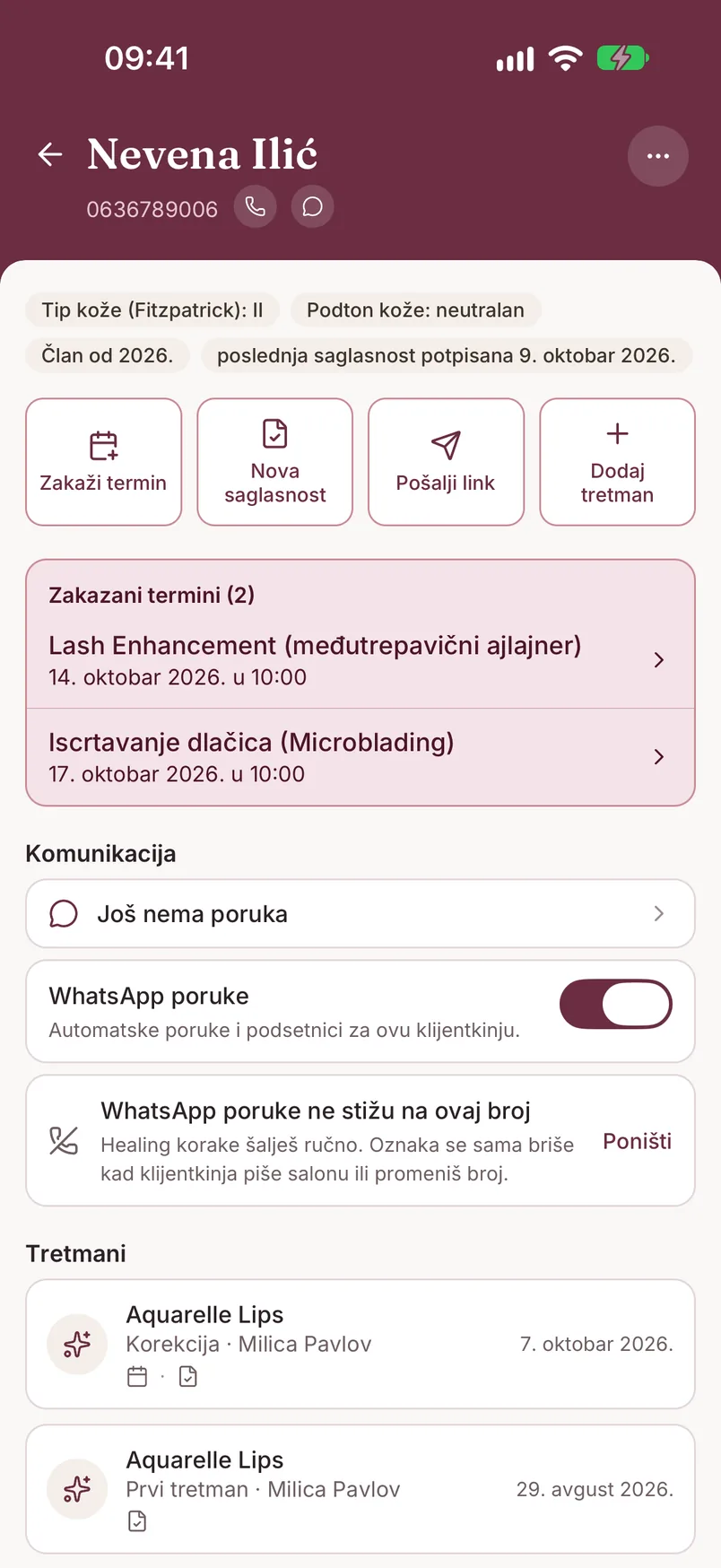
Neke klijentkinje nemaju WhatsApp na broju koji si upisala. Na kartonu, u delu „Komunikacija", u redu „WhatsApp na ovom broju" dodirni „Poruke ne stižu".
Od tog trenutka healing koraci za nju idu ručno, a u listi „Danas ručno" za nju nema dugmeta „WhatsApp" - ostaju SMS, poziv i kopiranje. Na listi klijenata pored njenog imena stoji precrtana slušalica.
Red na kartonu sada glasi „WhatsApp poruke ne stižu na ovaj broj", sa dugmetom „Poništi". Oznaka se i sama briše kad klijentkinja piše salonu ili kad joj promeniš broj. Ako WhatsApp pri automatskom slanju javi da broj nema WhatsApp, PMUdesk oznaku postavlja sam.
Odjava klijentkinje od poruka
Klijentkinja se odjavi sama. Ako na poruku odgovori sa STOP, PMUdesk joj više ne šalje nijednu automatsku poruku: zakazani koraci se otkazuju, a sekvenca se zaustavlja. Na ekranu sekvence stoji baner „Klijentkinja se odjavila od poruka [datum] - sekvenca je zaustavljena.", a na kartonu, ispod prekidača „WhatsApp poruke", piše „Klijentkinja je poslala STOP [datum]".
Isključiš je ti. Ako ti klijentkinja kaže da ne želi poruke, na kartonu isključi prekidač „WhatsApp poruke" i potvrdi u prozoru „Isključivanje poruka". To važi za sve automatske poruke - healing, podsetnike i potvrde termina.
Dok je prekidač isključen, novu healing sekvencu za nju ne možeš da pokreneš. Poruke vraćaš istim prekidačem. Ako klijentkinja posle STOP-a ponovo sama piše salonu, odjava se skida automatski.
Napomena o healingu
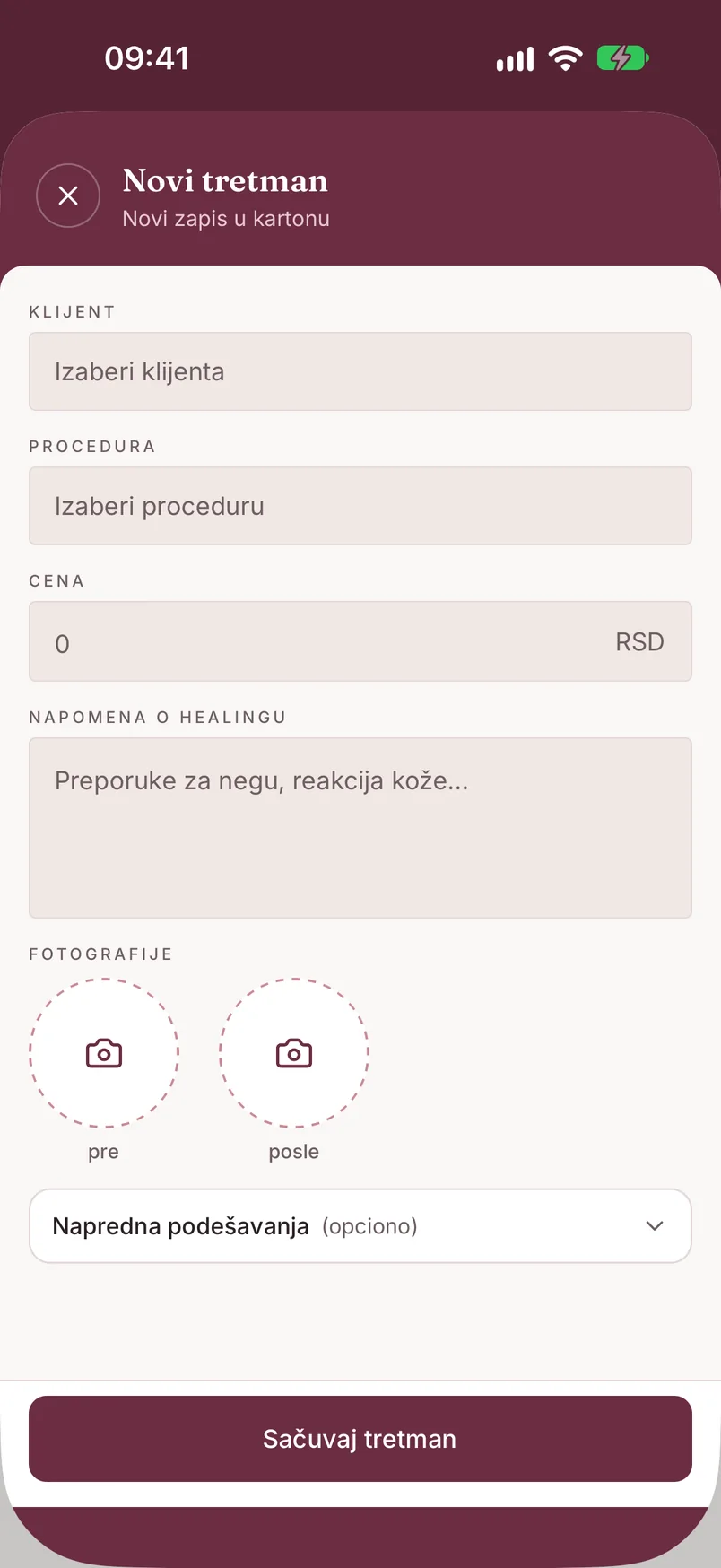
Nezavisno od poruka, u formularu tretmana postoji polje „Napomena o healingu" - za preporuke koje si dala i reakciju kože (npr. „blago crvenilo, uputila na negu"). Napomena ostaje uz tretman i vidiš je u njegovim detaljima kad klijentkinja dođe na korekciju.
Polje je dostupno na svim planovima.
Kad je vreme za osvežavanje
Ako je poslednji tretman klijentkinje stariji od 10 meseci, pored njenog imena na listi klijenata pojavljuje se oznaka „osveženje uskoro" - znak da je vreme da joj se javiš i ponudiš termin pre nego što pigment izbledi.
Oznaka radi na svim planovima i ne zavisi od healing poruka. Na Pro planu klijentkinja uz to dobija i poruku „Godinu dana od tretmana" iz sekvence.
What healing follow-up is Pro
Healing follow-up is a series of messages a client receives after a treatment, on a fixed schedule. You start it with one tap, and the app keeps track of which message is due when.
- Aftercare - immediately, as soon as you start
- Day 3 check-in - how it is healing
- Day 7 check-in
- 4-week check - a reminder about the follow-up check and touch-up
- One year after the treatment - time for a refresh
Which messages go out depends on the treatment type:
- First treatment - all five
- Touch-up - aftercare, day 3 and day 7
- Refresh - aftercare, day 3, day 7 and one year
There are two modes. In automatic mode PMUdesk sends the messages through your salon's WhatsApp number. In manual mode the app prepares the text and reminds you, and you send the message. The mode is chosen for you, depending on whether WhatsApp is connected.
Healing follow-up is part of the Pro plan, in both modes. On the free plan the "Healing follow-up" row in the treatment details carries a Pro label and leads to the offer.
The messages themselves are currently sent in Serbian.
Starting a sequence
The sequence does not start by itself when you save a treatment - you start it, once the treatment has actually been done.
Open the treatment details. Under "Healing follow-up" it says "Sequence not started"; tap "Send aftercare instructions". The "Start the healing sequence" dialog lists which messages follow for that treatment type - confirm with "Start".
After that the same row shows the progress (e.g. "1/5 sent"), and tapping it opens the sequence screen with all steps and dates.
Good to know:
- a sequence is started once per treatment
- for a treatment older than 7 days there is no button - it says "Historical treatment - healing messages are not available"
- the client must have a phone number on her card and must not be opted out of messages
- if you remove the treatment, the remaining scheduled messages stop
Automatic mode
When your salon's WhatsApp number is connected to PMUdesk, messages go out by themselves - from your number, so the client sees you, not an unknown number. How to connect the number: Connecting your WhatsApp number.
- The first message (aftercare) goes out right when you start. The others follow the schedule, but not at night - a message that would fall between 9 pm and 9 am waits for the morning
- The status of each step is on the sequence screen: "Scheduled", "Sent", "Delivered", "Read"
- The client's replies arrive both in the WhatsApp Business app on your phone and in PMUdesk - on the client card, under "Messages". You reply from your own WhatsApp app, and the conversation shows up in PMUdesk by itself
- A healing photo the client sends gets a "Save to chart" button - the picture is stored with the treatment, in the "healing" group
- The "Today" screen shows a "Healing: N clients waiting for a reply" card. Tapping it opens the "Waiting for reply" list; once you have replied, you mark the message as "Resolved"
If it turns out the client has no WhatsApp on that number, the step is labelled "No WhatsApp" and a banner offers "Continue manually" - the rest of the sequence then runs in manual mode.
Manual mode
A sequence runs manually when the salon's WhatsApp is not connected, or when messages do not reach that client's number. The schedule is the same - the only difference is who sends.
At the top of the sequence screen there is a banner with the reason, e.g. "WhatsApp is not connected - you send them manually.", with a shortcut "Connect WhatsApp and this runs automatically". Each step says "Manual" and the date it is due.
The step that is due has these buttons:
- "WhatsApp" - opens WhatsApp with the client and the message text prepared
- "SMS" - the same, as an SMS
- "Call" - if calling is easier
- "Copy" - copies the text so you can paste it anywhere (Viber, Instagram...)
- "Done" - tap it once you have sent the message; the step is labelled "Done"
- "Skip" - if you do not want to send this message
The first step (aftercare) is due right when you start. A step you do not mark within two days expires by itself, so your list does not pile up.
What is due today
You do not have to remember schedules. In the morning, after 9 am, you get a "Danas ručno" (Manual today) notification with the names of the clients you should contact today.
The "Today" screen has a "Manual today: N clients" card (with a note if something is left over from yesterday). Tapping it opens a list: for each client you see the step and the service, with the same buttons as on the sequence screen - send, tap "Done" and move on to the next one.
When you are finished, the list says "Everything is done for today."
When messages do not reach a client
Some clients do not have WhatsApp on the number you entered. On the client card, under "Messages", in the "WhatsApp on this number" row, tap "Not reaching".
From then on her healing steps run manually, and in the "Manual today" list she has no "WhatsApp" button - SMS, call and copy remain. On the clients list a crossed-out handset shows next to her name.
The row on the card now reads "WhatsApp messages don't reach this number", with an "Undo" button. The mark also clears by itself when the client writes to the salon or when you change her number. If WhatsApp reports during automatic sending that the number has no WhatsApp, PMUdesk sets the mark for you.
When a client opts out of messages
The client opts out herself. If she replies STOP to a message, PMUdesk no longer sends her any automated message: scheduled steps are cancelled and the sequence is stopped. The sequence screen shows the banner "The client opted out of messages on [date] - the sequence has been stopped.", and on the client card, under the "WhatsApp messages" switch, it says "The client sent STOP on [date]".
You turn messages off. If a client tells you she does not want messages, turn off the "WhatsApp messages" switch on her card and confirm in the "Turn messages off" dialog. This applies to all automated messages - healing, reminders and appointment confirmations.
While the switch is off, you cannot start a new healing sequence for her. You turn messages back on with the same switch. If the client writes to the salon again by herself after a STOP, the opt-out is lifted automatically.
Healing notes
Separately from the messages, the treatment form has a "Healing notes" field - for the recommendations you gave and the skin's reaction (e.g. "slight redness, advised on aftercare"). The note stays with the treatment and you see it in its details when the client comes back for a touch-up.
The field is available on all plans.
When it is time for a refresh
If a client's last treatment was more than 10 months ago, a "refresh due" label appears next to her name on the clients list - a sign that it is time to get in touch and offer an appointment before the pigment fades.
The label works on all plans and does not depend on healing messages. On the Pro plan the client also receives the "One year after the treatment" message from the sequence.