
Nalog i podešavanja
Account & Settings
Lični profil, jezik i tema, podsetnik za termine, promena lozinke, brisanje naloga, pretplata.
Personal profile, language and theme, appointment reminders, changing your password, account deletion, subscription.
Podešavanja — pregled
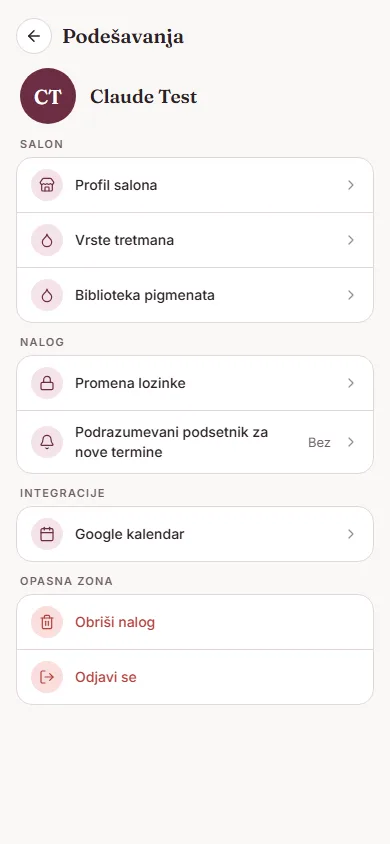
Ekran „Podešavanja" otvaraš iz menija. Podeljen je na sekcije: Salon (profil salona, vrste tretmana, biblioteka pigmenata), Nalog (lični profil, promena lozinke, podrazumevani podsetnik za termine, jezik, tema), Integracije (Google kalendar), Podrška (slanje feedbacka) i Opasna zona (brisanje naloga, odjava). Ako si zaposlena/zaposleni u salonu (artist), a ne vlasnik/vlasnica, deo ovih opcija ne vidiš ili su samo za čitanje.
Lični profil, jezik i tema
U Podešavanjima → Nalog → „Lični profil" menjaš profilnu fotografiju (dugme „Promeni fotografiju"), ime, prezime i kratku biografiju. Odmah ispod, „Jezik" i „Tema" menjaju izgled cele aplikacije trenutno, bez potrebe za ponovnim pokretanjem — dostupni jezici su srpski i engleski, a tema može biti svetla, tamna ili „Sistemska" (prati podešavanje telefona).
Podsetnik za termine
Aplikacija trenutno nema poseban prekidač za uključivanje/isključivanje notifikacija — jedino podešavanje je koliko unapred stiže podsetnik za nov termin. U Podešavanjima → Nalog → „Podrazumevani podsetnik za nove termine" biraš: Bez, 15 min, 30 min, 1 h ili 1 dan. Ova vrednost se automatski predlaže svaki put kad zakazuješ novi termin (možeš je promeniti i pojedinačno, na samom terminu).
Promena lozinke
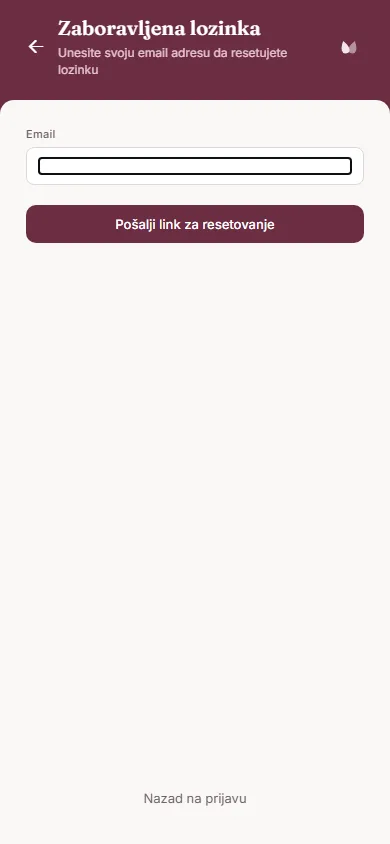
U Podešavanjima → Nalog → „Promena lozinke". Ovo ne otvara formu sa starom i novom lozinkom — umesto toga uneseš svoju email adresu i dodirneš „Pošalji link za resetovanje"; lozinku menjaš preko linka koji stigne na taj mejl (isti postupak kao „Zaboravljena lozinka?" na ekranu za prijavu).
Pretplata
Trenutni plan vidiš u Podešavanjima → Profil salona, kao oznaku „Trenutni plan" — Besplatan ili Pro. Za sada je ovo samo informativni prikaz, bez dugmeta za nadogradnju — model pretplate je u pripremi.
Brisanje naloga
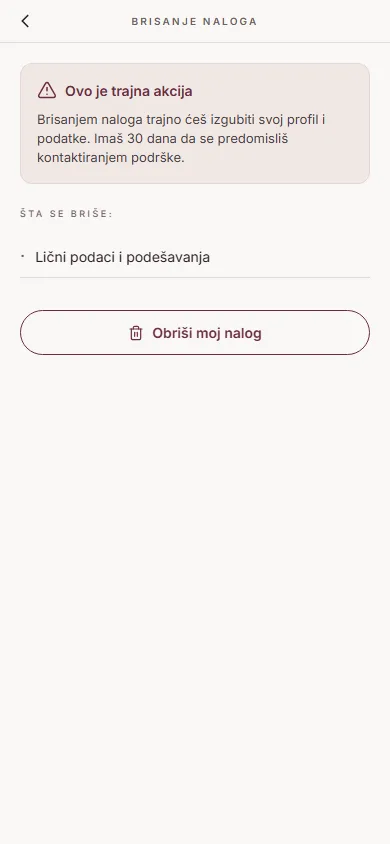
U Podešavanjima → Opasna zona → „Obriši nalog". Aplikacija upozorava: „Ovo je trajna akcija. Brisanjem naloga trajno ćeš izgubiti svoj profil i podatke. Imaš 30 dana da se predomisliš." Nakon potvrde („Obriši moj nalog" → „Da, obriši") nalog se ne briše odmah — u tih 30 dana ga možeš vratiti tako što se ponovo prijaviš: aplikacija prepoznaje da je nalog na čekanju za brisanje i nudi „Vrati nalog".
Detaljnije o tome šta se dešava sa podacima pročitaj na stranici Brisanje naloga.
Settings — overview
The "Settings" screen opens from the menu. It's split into sections: Salon (salon profile, treatment types, pigment library), Account (personal profile, change password, default reminder for appointments, language, theme), Integrations (Google Calendar), Support (send feedback) and Danger zone (delete account, log out). If you're staff at a salon rather than the owner, some of these options are hidden or read-only.
Personal profile, language and theme
In Settings → Account → "Personal profile" you change your profile photo ("Change photo" button), first name, last name, and a short bio. Right below it, "Language" and "Theme" change the look of the whole app instantly, with no need to restart — available languages are Serbian and English, and the theme can be light, dark, or "System" (follows your phone's setting).
Appointment reminders
The app doesn't currently have a master on/off switch for notifications — the only setting is how far in advance a reminder for a new appointment fires. In Settings → Account → "Default reminder for new appointments" you choose: None, 15 min, 30 min, 1 h, or 1 day. This value is suggested automatically every time you schedule a new appointment (you can still change it per appointment).
Changing your password
In Settings → Account → "Change password". This doesn't open a form with your old and new password — instead you enter your email and tap "Send reset link"; you then change your password via the link that arrives in that email (the same flow as "Forgot password?" on the sign-in screen).
Subscription
Your current plan is shown in Settings → Salon profile, as a "Current plan" badge — Free or Pro. For now this is purely informational, with no upgrade button yet — the subscription model is still being worked out.
Deleting your account
In Settings → Danger zone → "Delete account". The app warns: "This is a permanent action. Deleting your account will permanently remove your profile and data. You have 30 days to change your mind." After confirming ("Delete my account" → "Yes, delete") the account isn't deleted immediately — within those 30 days you can restore it simply by signing back in: the app recognizes the account is pending deletion and offers "Restore account".
For more detail on what happens to your data, see the Account Deletion page.